Most AI content tools end onboarding the same way: connect your site. Paste a WordPress application password, authorize a token with write access, hand over an API key. By that point the demo has already done its job, you’ve seen the sample posts, and they were fine. The connect step is the part of the product that deserves scrutiny, and it’s the part almost nobody scrutinizes.
So here’s the argument this post makes: the interesting question about an AI content tool is not how good is the writing. You can judge the writing yourself, one post at a time, before anything publishes, if the tool is built to let you. The interesting question is what can this tool do to you: the full set of actions its credentials permit on your site, whether or not anyone ever intends to use them.
Security engineers have a name for this: blast radius. Not “what does the tool do on a good day,” but “how much damage is possible on the worst day”, a vendor breach, a bad deploy, a prompt-injected model, a leaked key. On the worst day, intent is irrelevant. The only thing that bounds the damage is what the credential was allowed to do in the first place.
The demo shows the writing. The install screen shows the risk.
Content tools compete on samples. Landing pages show polished posts, tone matching, keyword tables. The credential request shows up last, after you’ve entered a card number, framed as a formality: connect your CMS and you’re done.
That ordering is backwards. The writing is the recoverable part of the deal; a bad post can be deleted. The credential is the unrecoverable part: from the moment you hand it over, your site’s worst-case outcome is defined by that credential’s scope, and it stays that way for as long as the integration lives. Most people can tell you what their content tool writes. Very few can tell you what it’s permitted to do.
What “connect your WordPress” actually grants
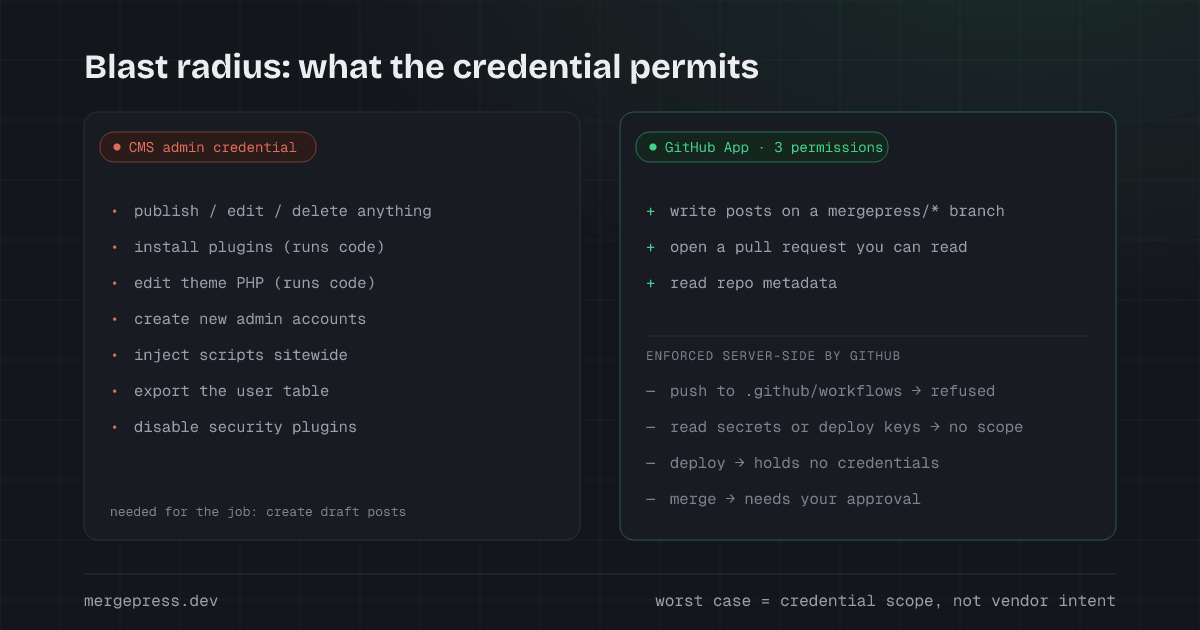
When a tool asks for a WordPress administrator account, or an application password issued from an administrator account, which carries the same authority, this is the capability list it receives. Not the features on the pricing page; the actions the credential permits:
- Publish, edit, or delete any content on the site: every page, every post, including the ones it didn’t write.
- Install and activate plugins. A plugin is arbitrary code executing on your server, with database access.
- Edit theme files through the built-in file editor, PHP that runs on every page load. Code execution again, by another door.
- Create new administrator accounts, which keep working even after you rotate the original password.
- Inject scripts sitewide through theme, widget, or plugin edits, the mechanism behind most SEO-spam and redirect infections.
- Read and export the user table, customer names and email addresses included.
- Deactivate the security and backup plugins that were supposed to catch all of the above.
The tool needs a sliver of the first item, create draft posts, and holds everything else as a side effect of how CMS role systems work. WordPress roles were designed for human staff, not for third-party services, and the role that can publish is bundled with the roles that can do everything.
Hosted platforms are structurally similar. A site-wide API token for a hosted CMS typically writes to any collection and can publish live; scoping varies by platform, but the pattern holds: the tool asks for far more authority than the feature requires, because that’s the shape the credential comes in.
None of this claims any vendor is malicious. Blast radius is not a judgment about character. It’s arithmetic about the worst case, and the worst case arrives in mundane ways: the vendor’s database gets breached and your credential is in it; a bug fires a delete where it meant an update; a model ingests a web page that was written to manipulate it; an employee’s laptop is compromised. In every one of those, the damage stops exactly where the credential’s permissions stop, nowhere earlier.
“We’re careful” is not an architecture
Raise any of this with a vendor and the reply is usually a policy: we only use the publishing endpoints. Access is logged. Our staff is vetted. We take security seriously. All of it may be true. All of it is a property of the vendor, not of the system, and the worst day is precisely the day the vendor stops being themselves.
There’s a simple test for telling the two apart. Ask what happens when a bug, not an attacker, just a bug, tries to do something out of bounds. If the answer begins with “our system is designed never to…,” you’re hearing policy: a promise that the vendor’s own code will keep behaving. If the answer is “the request fails, because the credential cannot do that,” you’re hearing architecture: a limit enforced by someone other than the party being limited.
The distinction gets sharper with AI in the loop. A model that researches topics reads pages from the open web, and a page can contain instructions aimed at the model rather than at human readers, prompt injection. If the model’s output has a direct path to your production site, an injected instruction has that same path. You cannot fully solve this with a smarter model or a better system prompt; what you can do is shrink the set of things the model’s output is allowed to become. An output that can only ever become a proposal for a human to read is a categorically smaller risk than an output that can become a live page, or code.
What server-side enforcement looks like
Here is the concrete version, using the system we run. MergePress operates as a GitHub App with three permissions on the install screen: Contents (read & write, read the site to learn its structure, write posts to a branch), Pull requests (read & write, open the PR, read your review), and Metadata (read, GitHub’s mandatory baseline). That list is the whole product pitch, and the load-bearing part is what’s absent from it.
GitHub’s permission model carves workflow files out into a separate Workflows permission. An app that doesn’t hold it cannot push any change touching .github/workflows/, GitHub’s servers refuse the push, per GitHub’s own documentation. Not “flagged for review.” Refused. We never request that permission, which means the CI pipeline that builds and deploys your site is out of reach no matter what our code does, the enforcement lives on GitHub’s side of the fence, where neither our bugs nor our worst day can touch it.
The contrast case is instructive: dependency bots like Renovate have to request the Workflows permission, because updating action versions inside workflow files is their actual job. A content service has no such need, a content tool asking for workflow access is asking for something its job cannot explain.
The same partition covers the rest. Repository secrets, deploy keys, and settings sit behind separate permissions we don’t hold; there is nothing to leak because there is nothing we can reach. And we hold no deploy credentials for any platform, when a PR merges, your existing pipeline deploys, the same way it does for every other commit.
A pull request is a document you can read
Scope is half of the model. The other half is what a “change” physically is.
In a CMS integration, a change is a mutation inside a database you can’t easily inspect, and “review” is whatever state the vendor’s dashboard chooses to show you. In a git-based flow, a change is a diff, a document listing every new line, every touched file, in full, before any of it exists on your site. There’s no summary standing between you and the actual change. What you read is what merges; the worst case of a PR you don’t like is a PR you close.
The approval itself becomes a record. When you approve (a one-tap email link or an ordinary PR review), the merge carries that fact with it: who approved, when, through which channel, attached to exactly this diff. It lives in your repository’s history, on infrastructure you own, not in a vendor dashboard that vanishes with your subscription. Google’s spam policies now explicitly target scaled content published without human oversight; a repository where every post carries a recorded human approval is the strongest evidence of oversight you can hold, an audit trail rather than an assurance.
What git-revert means when you don’t speak git
The phrase “it’s all in version control” lands poorly with non-technical owners, so here is the plain version.
Every merged change is a commit: a labeled snapshot of exactly what changed. Reverting one doesn’t restore a backup or rewind your site to last Tuesday, it creates a new change that is the precise opposite of one earlier change, and only that one. The post you regret disappears; everything published after it stays put; the history keeps both the mistake and the correction, honestly.
For an owner, that reduces to one sentence: undo is one click, forever. GitHub puts a Revert button on every merged pull request. It works six months later. It works after you cancel, the repository, the posts, and the undo button are all yours, requiring nothing from us. Compare that with the CMS alternatives: restoring a whole-site backup (losing everything since), or trusting an in-app undo that exists at the vendor’s pleasure.
What this model does not protect against
An honest security page lists its own limits, so:
- Bad prose you approve is still bad prose. The trust boundary bounds what the tool can do without you. It has no opinion about what you wave through. A pull request makes real review possible and recorded; it does not make it happen.
- Approval fatigue is real. Tap Approve without reading and the audit trail dutifully records diligence that never occurred. Low volume is the deliberate mitigation, a few posts a month is a readable amount, thirty is not, but a mitigation is not an immunity.
- Approved mistakes ship. Sandbox build-verification catches broken builds before you ever see the PR, but a factual error you approve goes live like anything else. Revert makes it cheap to walk back; it doesn’t make it not have happened.
- The rest of your stack is out of scope. Your registrar, DNS, and hosting credentials are exactly as safe as they were yesterday. This model just declines to add a new key to the pile.
Stated plainly: this architecture removes the failure modes that don’t require your participation. The ones that do require it remain yours.
The question to ask before you connect anything
Before the next tool gets a credential to your site, ask the vendor one question: if your systems were completely compromised, what is the worst thing that happens to my website? Then grade the answer by who enforces it. If the honest answer is “an attacker would hold an admin credential to your CMS,” that’s the product, whatever the demo looked like. If the answer is “an attacker could open a pull request, which you would read and decline,” you’re looking at a different kind of product.
That question is the reason MergePress is built to only open pull requests, and the complete permission list, including what’s deliberately missing from it, is documented on the security page. The install screen is the pitch.